 Lazarus
Every agent.
One mind.
Lazarus is the free Mac IDE where Claude, Grok, Cursor, Codex and Gemini work on one project, know what the others changed, and cost you less to run.
The IDE is free, needs no account and has no telemetry. Bring the agent plans you already pay for.
The editor, every mode, every agent, the Hub and the Blueprint. No trial and no seat. Never behind a paywall.
Claude Code, Grok Build, Cursor, Codex and Gemini each sign in with the tool you already use. Lazarus adds no charge on top.
The builders' world inside Lazarus, for ages 18 and up. It is not in the current release, and the IDE never goes behind it.
Claude, Grok, Cursor, Codex and Gemini are separate services from Anthropic, xAI, Anysphere, OpenAI and Google. They bill you under their own terms, and Lazarus is not affiliated with or endorsed by them. Odyssey terms
Five ways to look at one project.
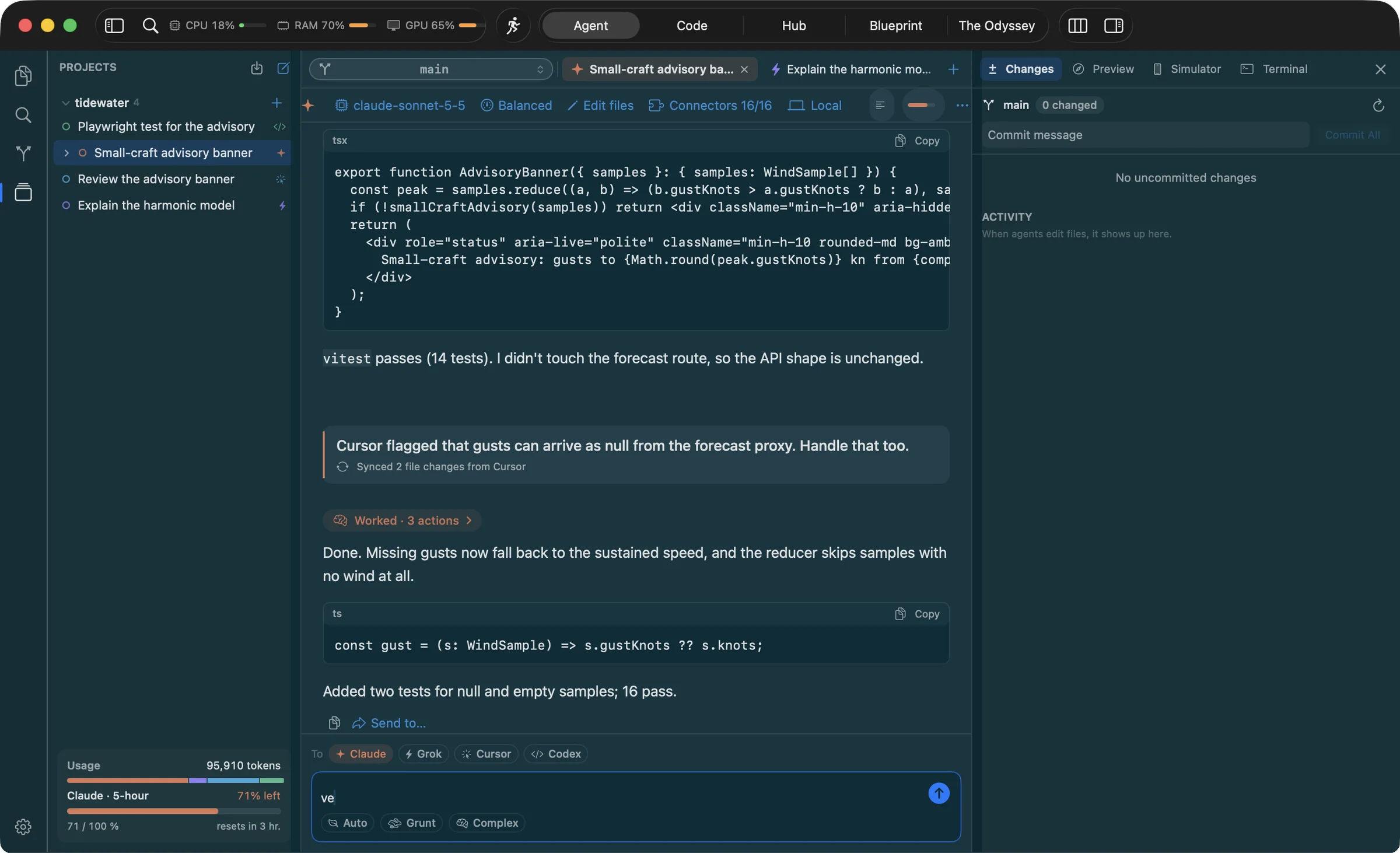
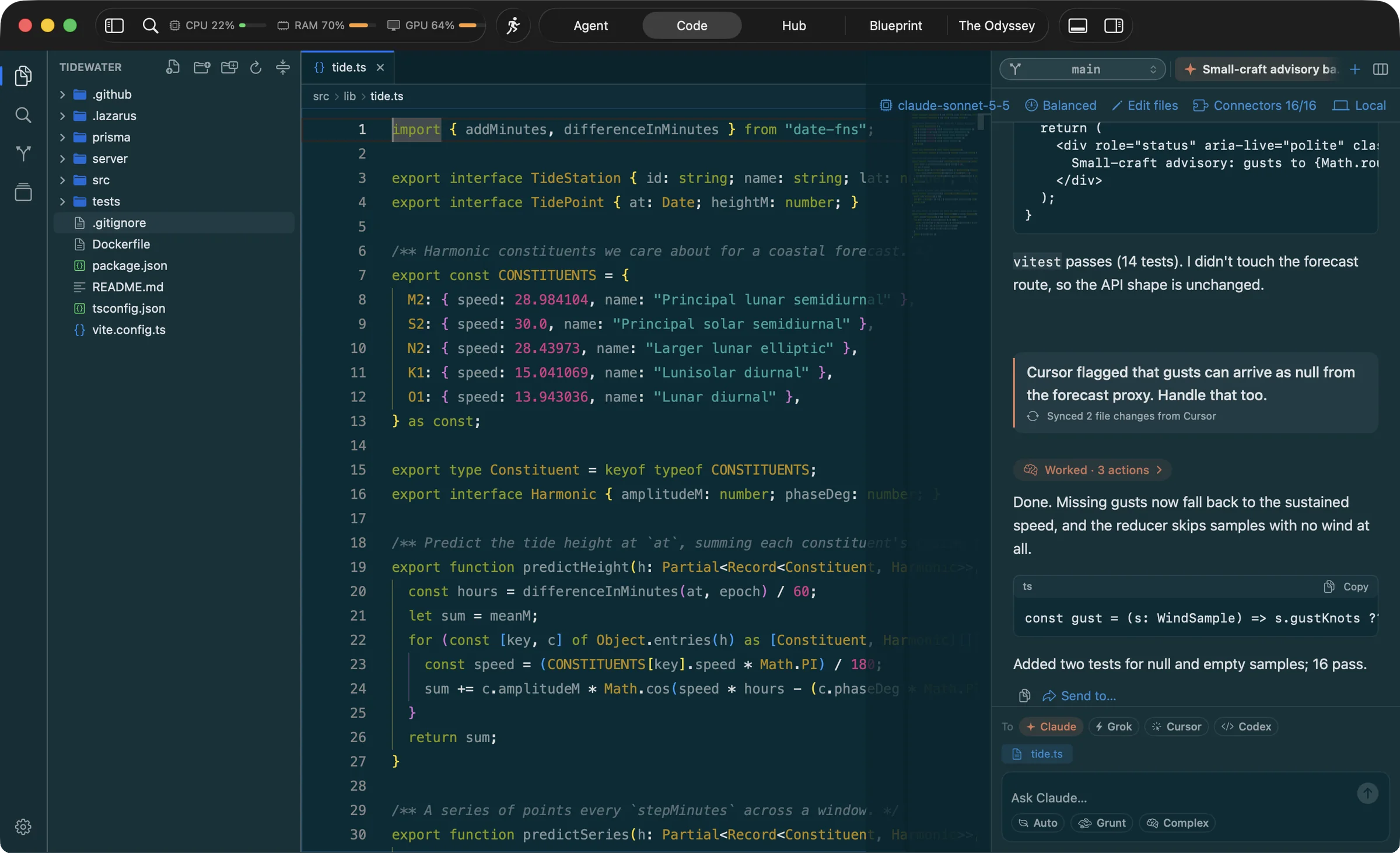
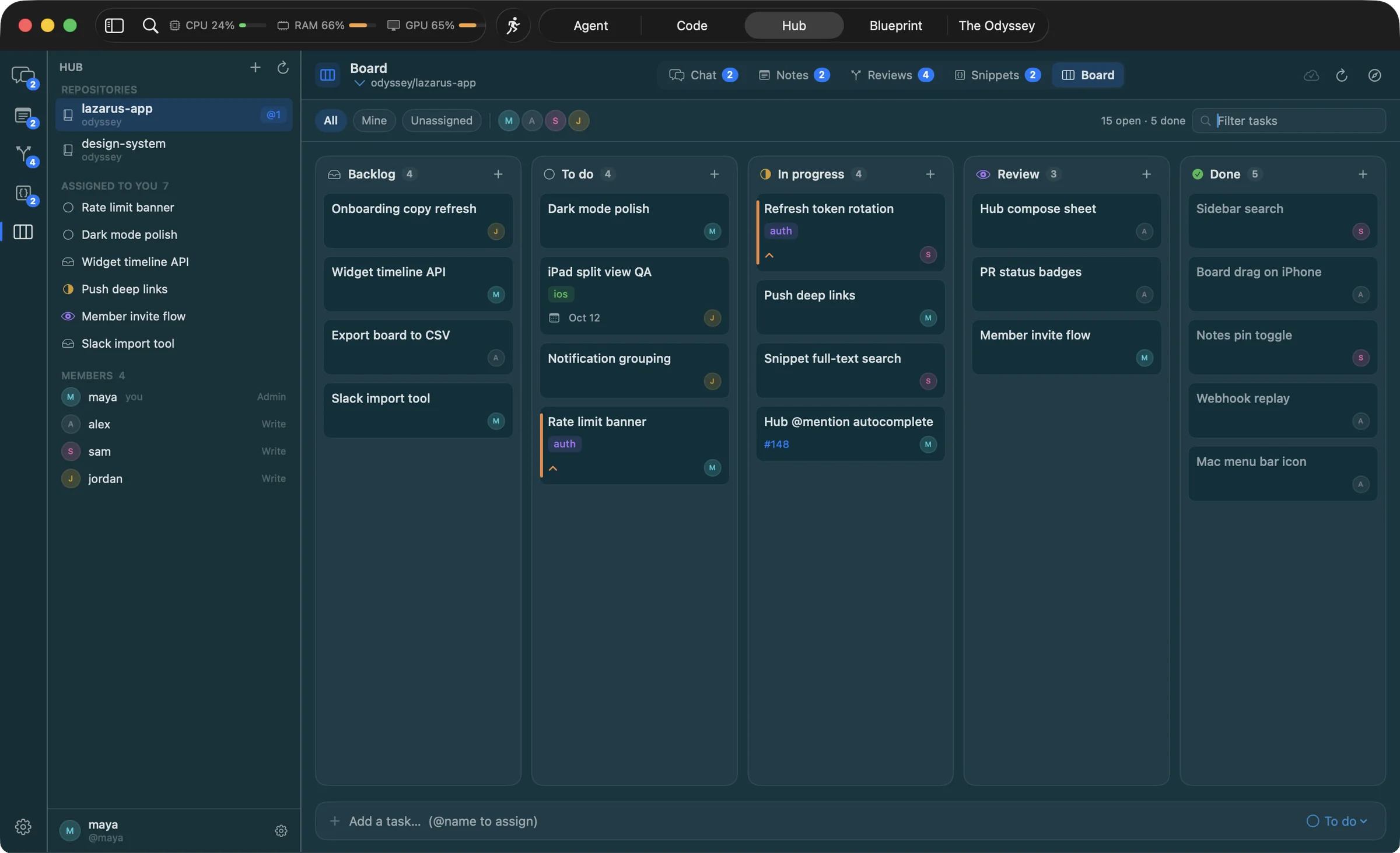
The toolbar switches between them. These are real screenshots of the app, taken on a sample project with a scripted demo conversation.
-
Agent mode
One big conversation, or every agent in its own column. A Changes inspector shows the diff each one made, with a commit box and an activity feed, so you review while they work.
-
Code mode
The full editor, built on Monaco, with agents docked on the right. Explorer, quick open, find in files, source control, terminals, a web preview and the iOS Simulator.
-
Hub
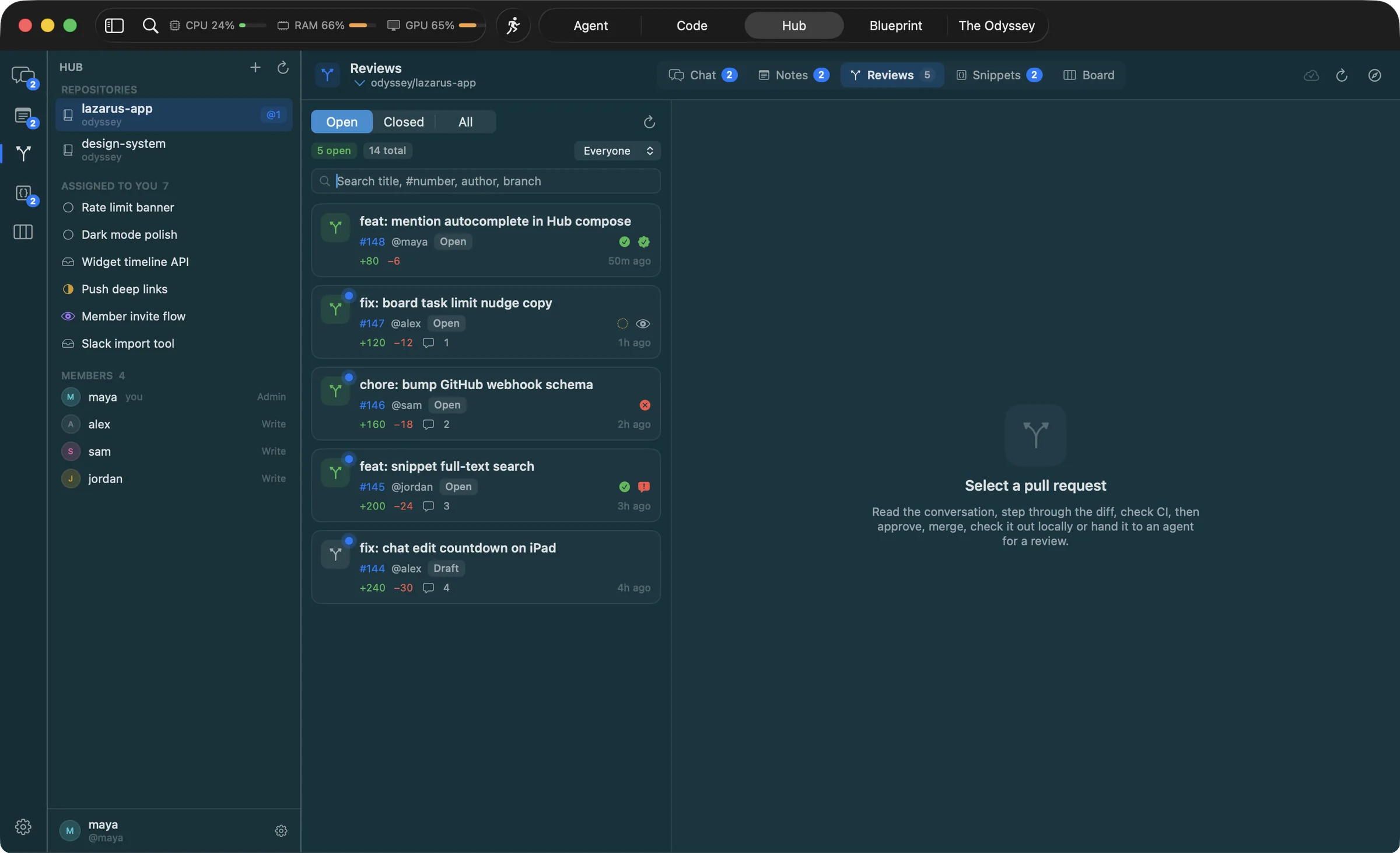
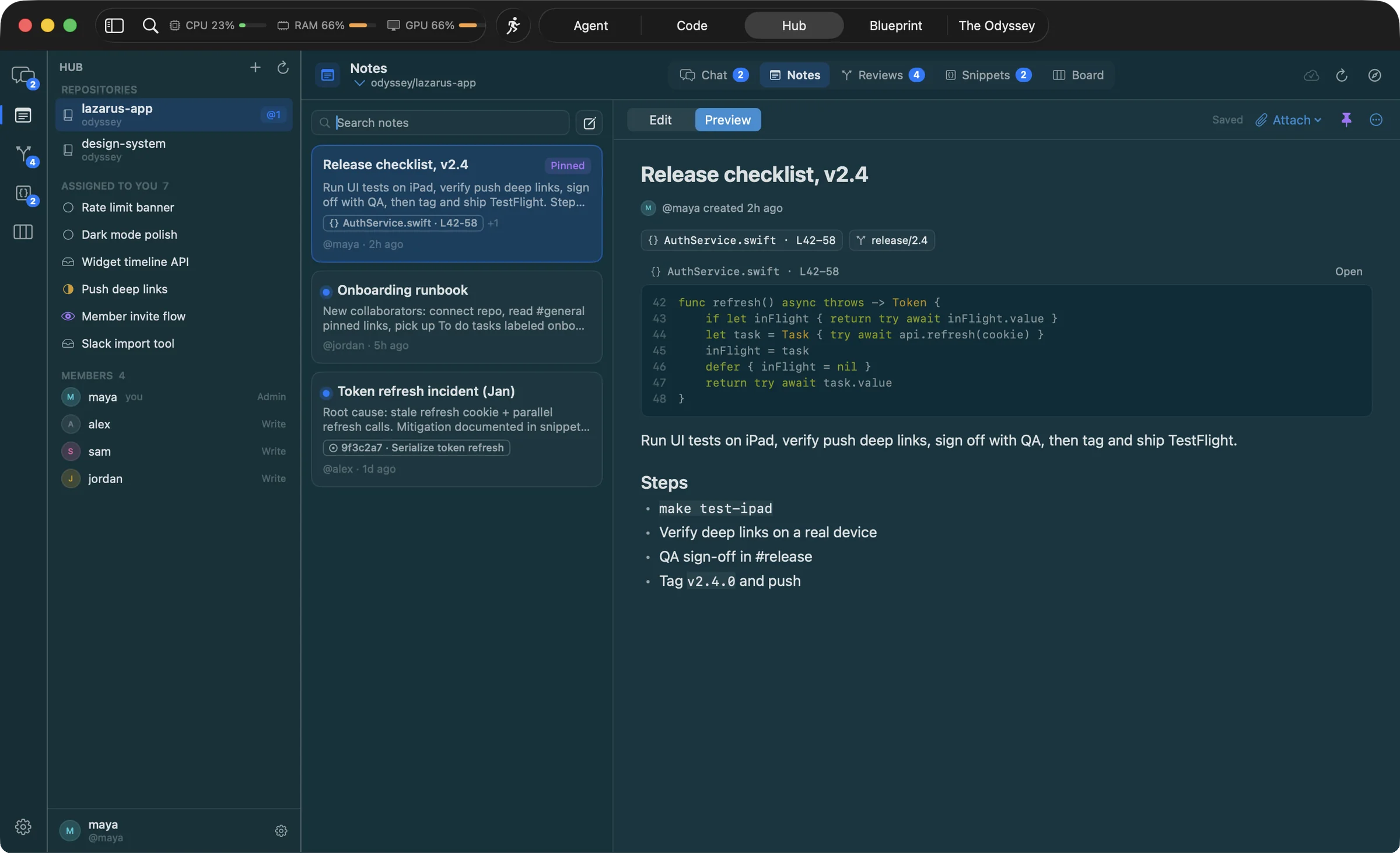
Your team's chat, notes, snippets, pull requests and task board, stored in your own GitHub repos. Nothing to host.
-
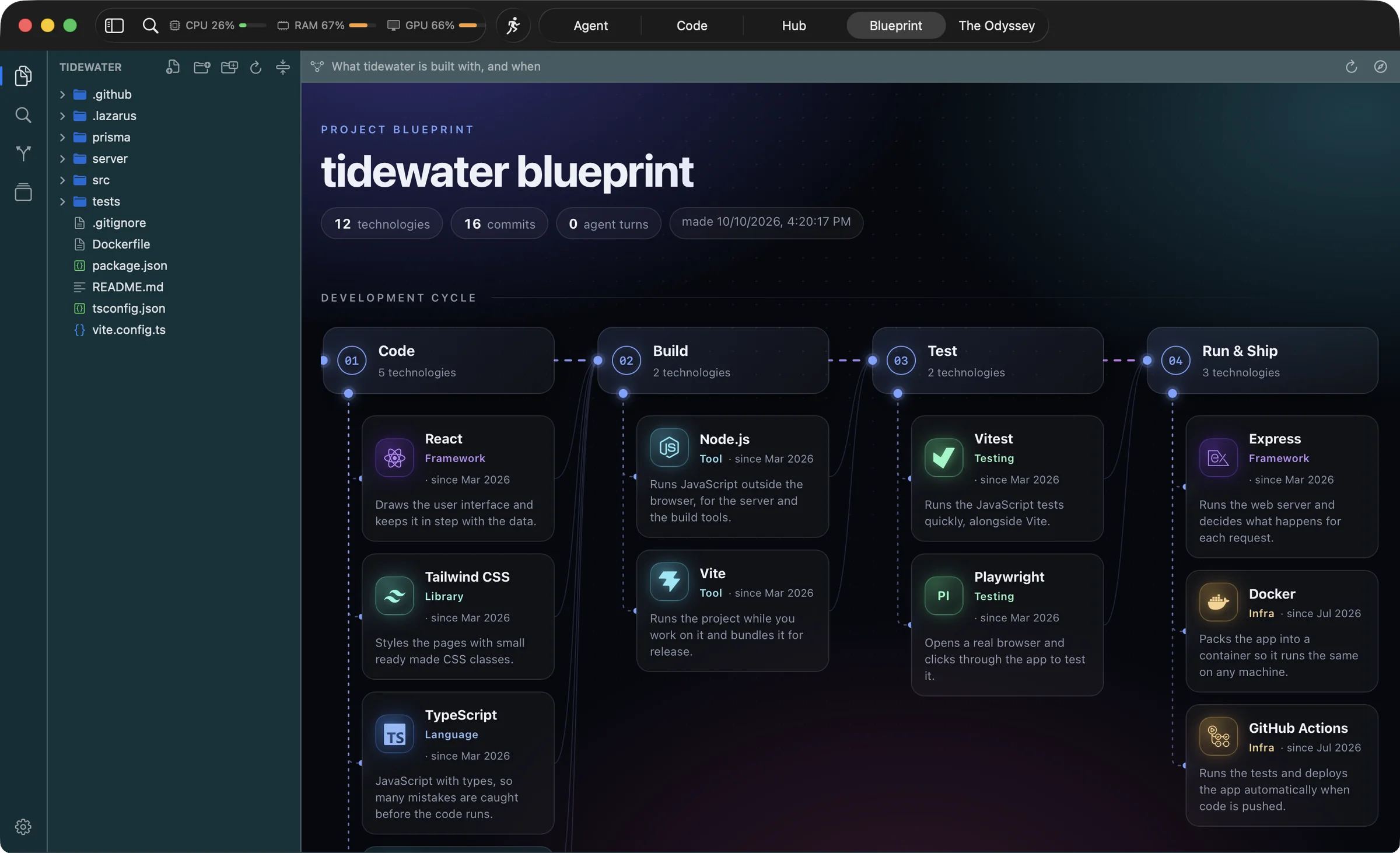
Blueprint
What the project is built with, how it flows from code to ship, when each piece arrived and who committed what. Drawn locally from your manifests and git history.
-
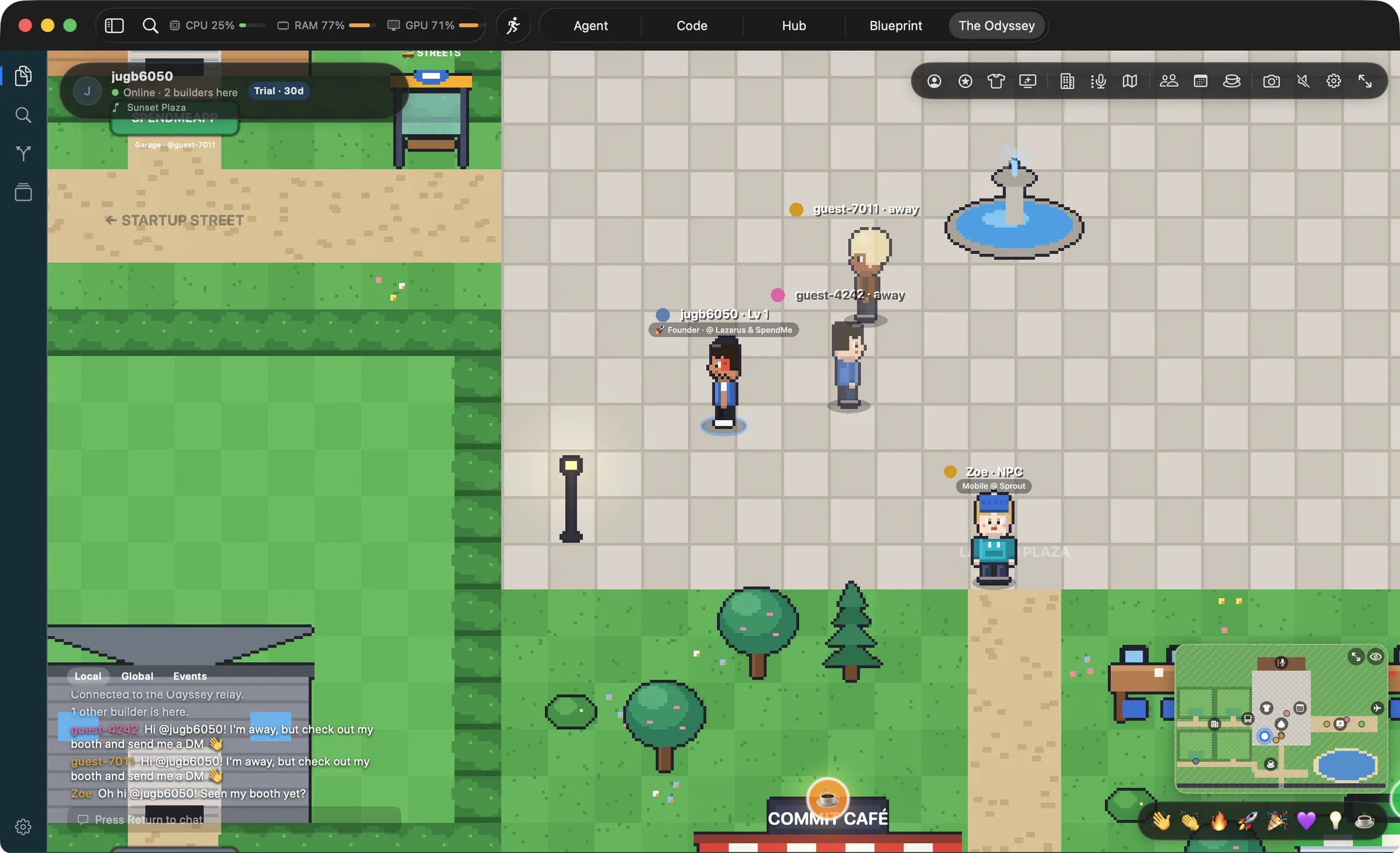
The Odyssey Coming soon
A pixel city for builders. Walk around as your GitHub character, pitch on the Demo Day stage, build your startup's HQ and meet founders while your agents run.
Five agents that actually work together.
Most tools give you one assistant. Lazarus puts Claude, Grok, Cursor, Codex and Gemini in the same project, each told what the others did before it answers.
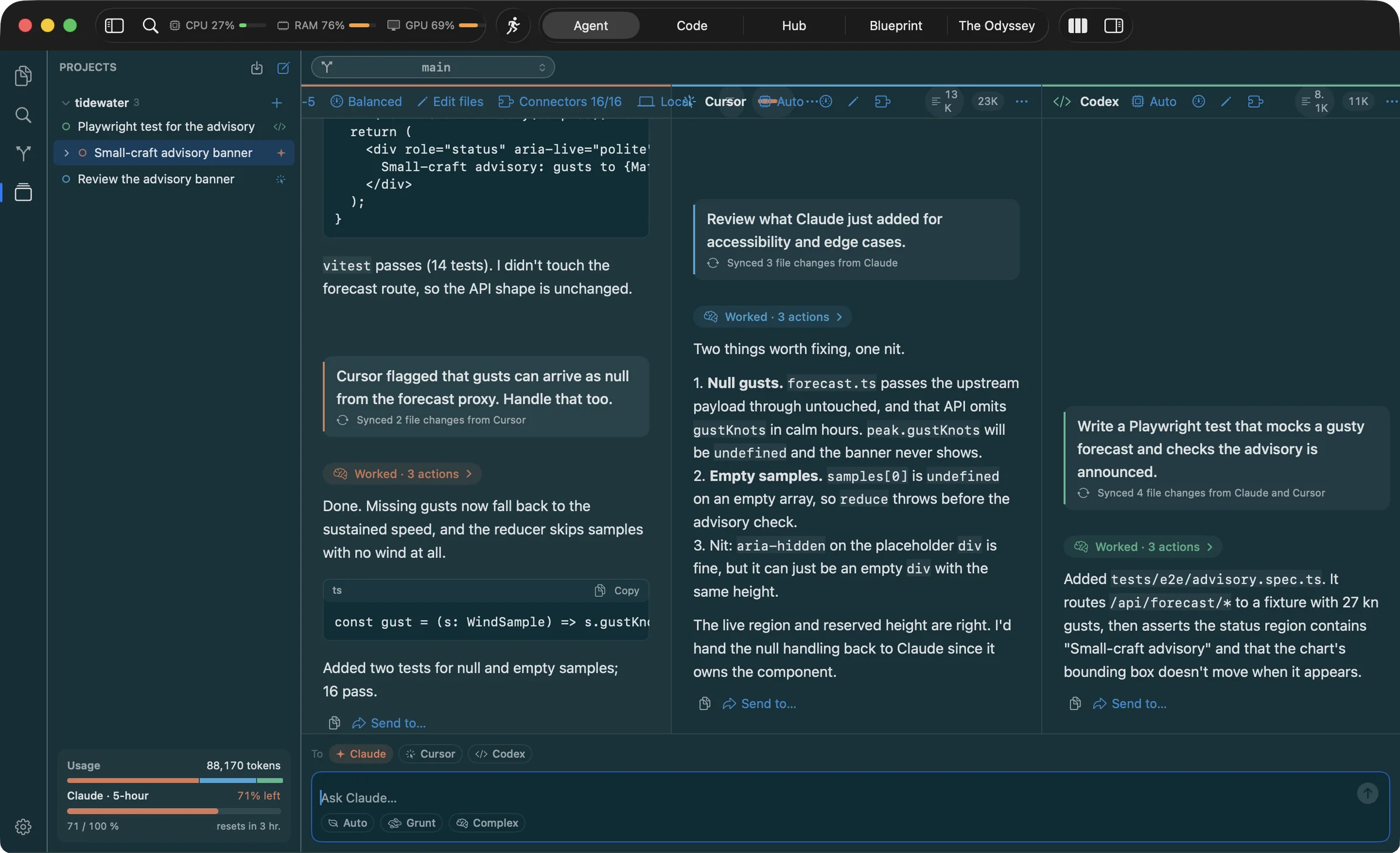
One composer, any mix of agents
Send a prompt to Claude and Grok at once, read both diffs, keep the better one. The open file, your selection, files from the explorer and screenshots ride along.
Hand a reply across, on the fly
Let Claude write the feature, pass its reply to Cursor to review, then to Codex for tests. Nothing to re-explain: each agent is already caught up.
A shared ledger of what happened
Every finished turn is written as a short digest to a file in the project. Before each message an agent reads only what it hasn't seen, under a fixed budget. Agents you run outside Lazarus can join through a tiny MCP server.
Images in, screenshots in
Paste a picture, drop one on the composer, snapshot the iOS Simulator or the web preview, or press a shortcut and the screen is attached to your next message.
See everything live
Streamed thinking, tool calls as they happen, token usage, rate-limit and budget bars on every agent. Permissions are per agent; API agents have no tools at all.
Bring what you already have
Import past Claude Code, Cursor, Codex, Grok and Gemini conversations from the welcome tour and pick one up exactly where it stopped. Install MCP servers and skills once and tick which agents get them. Start Claude cloud sessions from the same composer.
Long chats stop costing a fortune.
A normal chat re-reads its whole history on every turn, so the price climbs with each message. Lazarus keeps the price flat without you managing anything. Drag the slider and watch the network thin out.
An illustration of tokens read across one chat, not a benchmark. Lazarus shows its own running tally in the sidebar; it is a conservative estimate, not billing. Your savings depend on your chats, models and plans, and are not guaranteed.
Sub-agents in the same chat
When a chat grows large, goes cold or changes topic, the agent carries on in the same chat on a fresh context with a compact digest of what came before. The transcript on screen never changes. Each refresh appears as a sub-agent under the chat, so you can read just that part.
Automatic model routing
Easy prompts go to a cheaper model and hard ones to a stronger one. Grunt and Complex pin it either way. Thinking effort is lowered for small mechanical jobs, for that message only.
Caching and trimmed history
Prompt caching for Claude API agents. Old attachments and long replies are not re-sent by API agents on every request.
Digests, never transcripts
What agents learn about each other arrives as short digests under a fixed character budget, so the cost per message stays small however long the project runs.
Bug testing that starts at zero tokens
Compilers, test runners and regexes find what they can for free. Then cheap scan agents get files packed into shards, answer in one terse line per finding, and results are cached per file so re-runs only pay for what changed.
A meter on every agent
Context size, rate limits and budget stay visible, and a Saved tally adds it up. Nothing about a long run should surprise you.
Saves tokens. Saves your Mac, too.
An IDE that runs five agents, a world and a team space has to be light, or nobody keeps it open. Lazarus is a native Mac app that watches its own footprint and tells you what it costs.
- Live usage in the toolbar. CPU, memory and GPU widgets you can switch on in Appearance, sampled only while they are on screen. You always know what the IDE is taking.
- It trims itself. Lazarus tracks its own memory and, past a set share of your RAM or when macOS signals pressure, drops what it can rebuild: web views, caches, buffers and the blueprint page. Heavy work pauses while the window is hidden.
- It backs off when the Mac is busy. Thermal state and Low Power Mode stretch polling intervals and stop animation, so a long agent run never fights your build for the fans.
- The world will weigh nothing. The Odyssey, coming soon, draws every sprite in code and synthesises every track at launch, so it ships without a single image or audio file, and sleeps while you are in another mode.
- Small everywhere. One editor host per project, so files share it. Hub polling asks GitHub "anything new?" and a "no" is free. The whole app downloads in under 20 MB.
A real editor, built on Monaco.
The engine inside VS Code, bundled in the app so it works offline and makes no network requests of its own. Everything you expect from an IDE is here, with agents one shortcut away.
- Editing. Multi-cursor, find and replace, folding, sticky scroll, diff view, minimap, syntax highlighting for every major language. Undo history survives tab switches.
- Getting around. Quick open, a command palette, find in files, an explorer with git status, and tabs or chats you can tear off into their own window.
- Source control that names names. Changed files and diffs show whether you or which agent made the edit. Commit, push, pull and switch branches without leaving the window. Agents are warned when the branch moves under them.
- Terminals, preview, Simulator. Several terminals, a web preview at phone and tablet widths, and the iOS Simulator mirrored live. Build, run and test any Xcode scheme, then send a failing build to your agents with one click.
- Inline suggestions. Optional, Tab to accept, using a small fast Claude model through your own API key. Off until you turn it on.
- Bug testing mode. A free local pass first, then cheap scan agents, then fix agents that only ever see the deduplicated findings. Full mode runs your tests and writes regression tests.
⌘P open file ⇧⌘P commands ⇧⌘F search ⌘L ask an agent ⌘J panel
Blueprint: your project, drawn from its own history.
Open any folder and Lazarus draws what it is built with, how it flows through the development cycle, when each technology arrived and who committed what. No model call, and nothing about your code leaves your Mac. The one request is for public technology logos, fetched by name from a CDN.
The development cycle
Code, build, test, run and ship, with every technology placed on the stage it belongs to and a plain-English line on what it does. Add a note of your own to say what it does in this app; notes survive regeneration.
Timelines and a calendar
A tech timeline shows when each piece arrived. A commit timeline and a calendar show the rhythm of the work. Filter by collaborator to see who did what, including which agent.
Yours to keep and share
Written to the project as JSON, Markdown with a Mermaid chart and a self-contained web page you can export. In The Odyssey you can show an aggregate of it at your booth, with the repo owner's approval and never a commit message, email or file path.
The boring parts run themselves.
Small habits that keep a project tidy, done by the IDE instead of by you.
READMEs that update themselves
After each commit, a git hook writes a short plain-English entry into the README under Recent changes and commits it separately, so it goes out with your next push. Turn it on in Settings; opt any single repo out.
Auto snapshot
Every few minutes, while a project has uncommitted work, Lazarus saves it to git. A bad edit or a rogue agent can't cost you more than one interval. Never interleaves with a merge or rebase, never prompts.
Gotta Go
One click before you close the lid. Saves every file and chat, stops agents mid-turn, and writes a handoff note in each open project so you, or an agent, can resume exactly where you left. Nothing is committed or pushed without you.
Commit, push, pull, branch
All from the window you're already in. The branch picker stashes uncommitted work when you switch, and shows remote branches you haven't checked out yet.
Fix with agents
A failing build or test run becomes a message to the agents you pick, with the error lines attached. Simulator and preview snapshots attach the same way.
A three-minute welcome
The tour installs each CLI, signs it in, links GitHub, picks your theme and your starting mode, all on one screen. Replay it any time from Help.
The Hub: your team, in your repo.
Chat, notes, snippets, pull-request reviews and a task board for every GitHub repo you share. It all lives on a branch in the repo itself, so there is no new server, no new account and nothing to pay for.
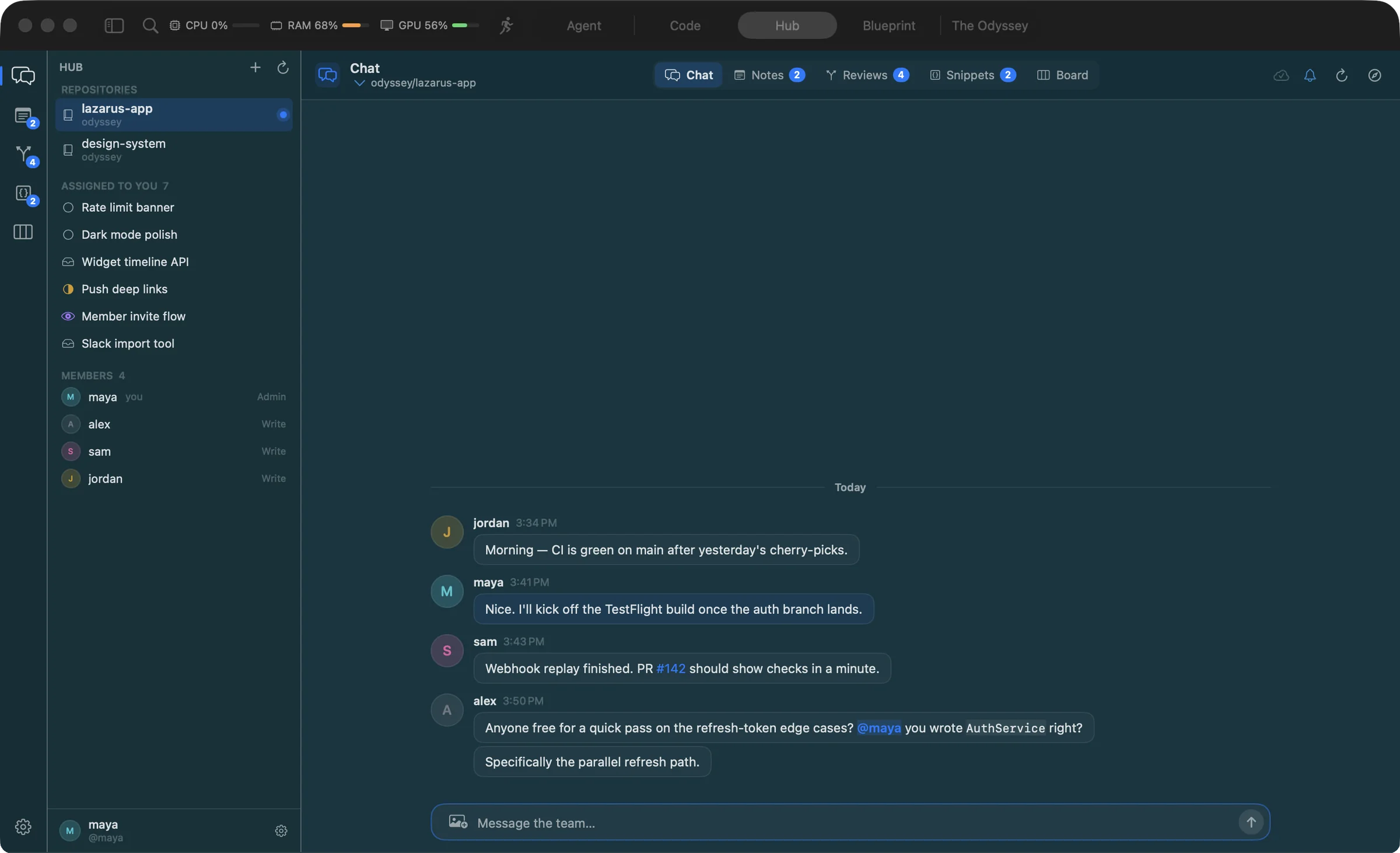
Everything in one place
Team chat with pictures, @mentions and #PR completion. Notes with Markdown preview and attachments. Snippets you can insert at the cursor. A board you drag cards across, with assignees, priority, due dates and labels.
Pull requests, properly
The whole list with CI state, review decision and size in one query. Read the conversation, step through the diff, check CI, approve, merge, check it out locally, or hand it to an agent for a review.
Notifications that land
Unread badges and notifications that open the right thread, on this Mac or pushed to your phone. Polling adapts to what you're looking at, so the Hub stays light and never counts against your GitHub rate limit when nothing changed.
The Odyssey: a city for builders, inside your IDE.
Coming soon. Not in the current release.
Agents take minutes. The Odyssey gives you somewhere to be while they run: a lightweight pixel world where you pitch, meet founders and investors, build your startup's office and hear the moment an agent finishes. All the networking of a startup city, without needing to live in one.
Network without the flight
Sign in with GitHub and you are a character; your public profile, LinkedIn and website sit on your card. Connect with people, send DMs, and leave a message with someone's away stand-in when they are offline. Profiles carry flairs, a headline and what you are building.
Pitch and present
Write a pitch in Markdown and it becomes a deck; everyone on stage sees the same slide. Show a live web demo, a YouTube or Loom video, an image gallery or your project blueprint, with the IDE's own tools. Listeners rate the talk, and visitors answer your hypotheses in a tap: do they have the problem, would they use it, would they pay.
Build your HQ
Decorate your startup's building with collaborators: wallpapers, furniture, a meeting table, a pet bed. Turn voice on and your team talks inside while visitors listen. When a commit lands on main after you push, fireworks go off over your HQ for everyone nearby.
Events, hackathons, office hours
Verified investors open bookable office hours; founders take one slot each and meet in the investor's office. Admins announce hackathons with sponsors and prizes; form a team, submit, see winners announced. Public events go on the stage; private meetings have an invite list.
Your agents, in the loop
While you are in the world, Lazarus watches your agents. A chime and a toast the moment Claude finishes or Codex hits an error, with one click back to that chat. Step into the IDE and your character shows as coding; stay away and it sleeps at your HQ.
Voice, chat, progress
Voice for meetings and events runs peer to peer over WebRTC; the relay only decides who may speak. Local, global and events chat with a filter that keeps it civil. Quests nudge you toward the good parts and level up your founder rank. Seasons bring limited décor.
Built to stay out of the way
Every sprite is drawn in code and every track is synthesised at launch, so the world ships without a single image or audio file and runs inside the IDE. Offline it fills with resident characters, always labelled as NPCs. Controls are rebindable in game.
Free The IDE, always.
Soon The Odyssey, optional.
Pricing Announced at launch.
The Odyssey is not available yet. When it launches it will be optional and for people 18 and over. It will run on a relay we operate: your GitHub name and avatar and the profile you build will be visible to other players, uploads will be reachable by link, and direct messages will not be end-to-end encrypted. Badges like "verified" and "investor" are not endorsements, and nothing there is investment advice. Privacy · Odyssey terms
Also coming to iPhone and iPad: Agent, Hub and The Odyssey, so the city is in your pocket. Code mode stays on the Mac.
Make it yours, down to the pixel.
Lazarus should look like your editor, not ours. Everything here previews live, including the welcome tour.
- Eleven themes that recolour the editor too: System, Light, Dark, GitHub Light, Solarized Light, Solarized Dark, Dracula, Nord, One Dark, Monokai and Gruvbox Dark. Plus any accent colour.
- Three densities and see-through windows with optional blur, so your desktop shows through.
- Type. Fonts, ligatures, line height and cursor style. Soft typing and click sounds if you like them, off if you don't.
- Shortcuts. Every menu command can be rebound. The Odyssey has its own controls, editable in game.
- Your start. Land in Agent, Code or Hub mode, or reopen wherever you left off. Decide which agents are on by default and how much permission each one has.
- Settings for everything. General, Appearance, Editor, Chat, Notifications, Agents, Keybinds, GitHub and Skills. Forget them all with one button.
One GitHub sign-in unlocks the rest.
Lazarus works without it, but this is where it comes alive.
- Approve a code in your browser and you're in. Browse every repository you can see, private ones included, and clone with a click. This grants Lazarus GitHub's
repopermission; revoke it any time in your GitHub settings. - The Hub uses the same account. When The Odyssey launches, your character will take its name and avatar from it.
- Your token stays in the macOS Keychain and is handed to git only for github.com. The Odyssey, when it launches, will sign you in separately and ask GitHub for no permissions: it will read your public name and avatar and keep its own session.
Private by design.
No account with us. No server of ours between you and your agents.
- Chats, keys and settings stay on your Mac. Messages go only to the agents you choose. Secrets for integrations live in the Keychain, never in plain files.
- Monaco makes no network requests. The Blueprint is built with no model call, and only public technology logos are fetched, by name.
- The Odyssey will be the exception. When it launches it will be optional and run on a relay we operate. Nothing in the current release connects to it.
- This website counts visits without cookies. Our own anonymous page counts (no third parties, nothing that follows you between days) tell us which pages help. They are skipped if your browser sends Do Not Track.
- Delete everything from Settings, with a list of exactly what lives where. Read the full Privacy Policy.
Tell us what broke, or what you'd love.
Every message goes straight to the people who build Lazarus. Attach screenshots; they help more than anything.
- Bugs. Say what you did, what you expected and what happened. The macOS and Lazarus versions help.
- Ideas. A feature, an agent you want supported, a district you'd add to The Odyssey.
- Questions. If the answer isn't on this page, ask. We reply to the email you give.
Prefer email? Write to dev@odysseydevelopments.dev.
Download Lazarus for Mac. It's free.
- Version
- Latest
- Size
- Under 20 MB
- Requires
- macOS 14 or later
- Runs on
- Apple silicon and Intel
- Open the disk imageDouble-click Lazarus.dmg in your Downloads folder.
- Drag to ApplicationsDrop the Lazarus icon onto the Applications shortcut.
- Connect your agentsA three-minute tour installs and signs in each CLI without leaving the screen.
By downloading or using Lazarus you agree to the Terms of Use. Read the Privacy Policy and the open-source notices.
First launch: this build is not notarized yet, so macOS may stop it. Control-click Lazarus, choose Open, then confirm.
Need help? Email dev@odysseydevelopments.dev